Knowledge baseFARMGOD features
Sitemap: a live rack map of your mining farm, every miner in its slot
A mining farm sitemap shows each ASIC miner where it stands: container, rack, shelf, slot. FARMGOD's Sitemap is live, follows the MAC and is mapped by phone.
A mining farm sitemap answers the question every technician asks: where exactly is that miner? A dashboard can say that 10.20.3.84 lost a hashboard. It takes a map of the farm to say that 10.20.3.84 stands in container 4, rack R03, shelf 2, position 3.
Why a mining farm needs a sitemap
In a farm of thousands of ASIC miners, an IP address tells you nothing about a place. The usual answers are a spreadsheet of rack layouts, labels on the racks and someone walking the rows with a list. All of them go out of date the day a miner gets a new address from DHCP, is swapped or moves to another rack.
A miner sitemap ties each machine to its slot and keeps the map current by itself, so the person on the floor goes straight to the right rack.
What FARMGOD's Sitemap shows
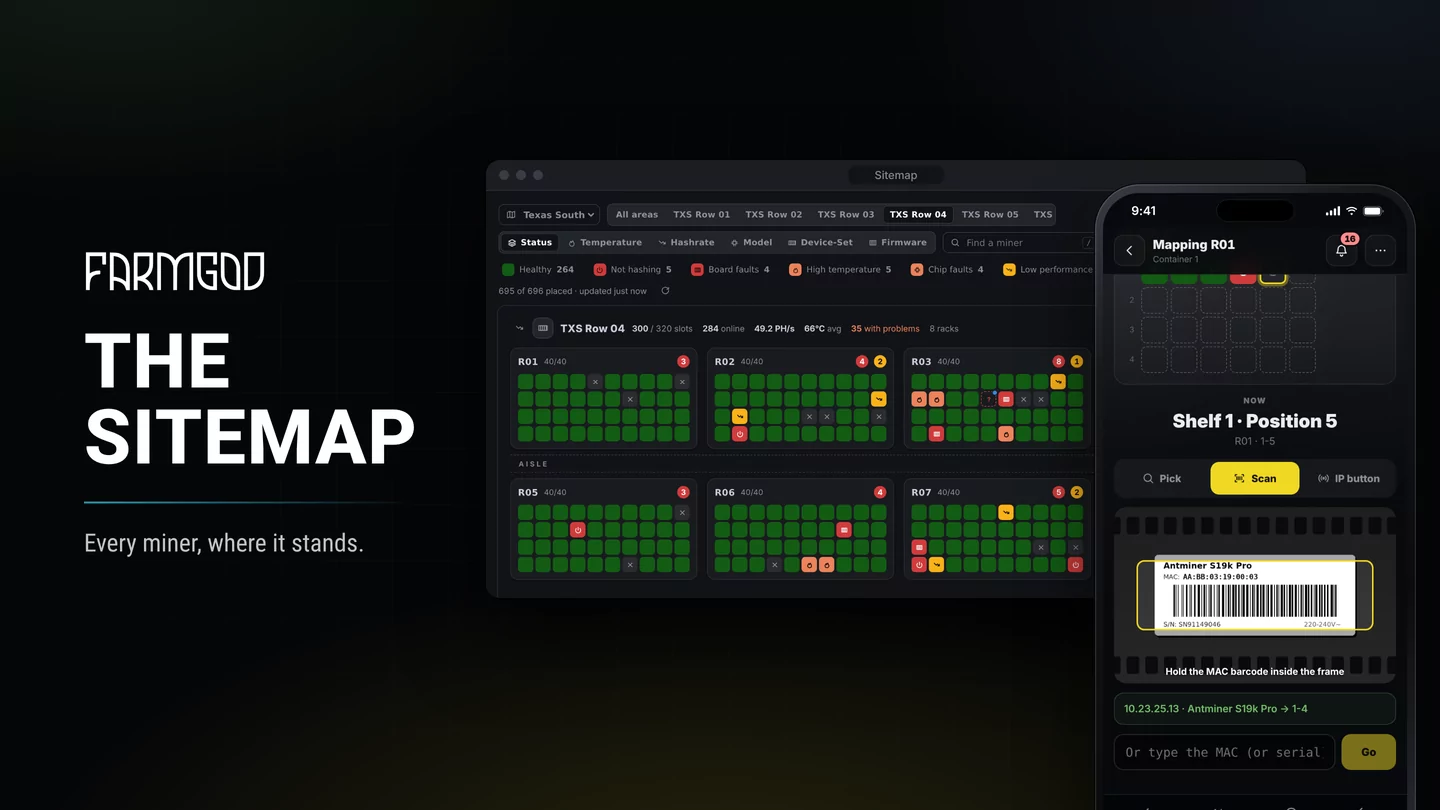
The Sitemap draws your site the way it is built: areas such as containers, halls and buildings, racks in lanes with an aisle between them, and each rack as shelves of slots. Every miner is a tile in its slot, live:
- Status: healthy miners stay green, problems stand out with their own colour, by the same rules as Fleet Health: not hashing, board and chip faults, too hot, below spec, failover pool, offline, asleep.
- Temperature, hashrate, model, Device-Set or firmware: the same rack map in other colours, for hot spots, tired machines or what stands where.
- Walk lists: the miners with one problem in the order you walk the floor, to copy into a message or print for the shift.
Mapping the racks with your phone
You build the map on site. Stand in front of a rack, and the phone leads you through it slot by slot and shows the miner most likely to stand there. Place it with a tap, scan the MAC barcode on its label, or press its IP Report button: the miner announces its IP and MAC on the network, the Kollektor hears it, and FARMGOD places exactly that miner. Antminers have the button on their control panel. A first draft can also come straight from your Device-Sets, one area per set with its miners in IP order.
Already keep your rack layout in a spreadsheet? Import it as a CSV file with the rack, shelf, position and MAC of each miner. FARMGOD finds every miner by its MAC and shows the whole site in a preview before anything changes, with the rows that need a look, such as a MAC with a typo or a miner listed in two slots.
Machines FARMGOD doesn't monitor, such as models it doesn't support yet or a switch, keep their slot as Other devices with their make, model, IP and MAC. Once FARMGOD monitors such a miner, it takes over the slot by its MAC.
By MAC, not by IP
A slot holds the miner by its MAC address. When a miner's IP changes, it stays in its slot. When a miner is swapped, the Sitemap notices that the old one is gone, finds the new one that took over its IP and offers it as the replacement. Every placement, move and replacement is kept in the slot's history.
Every miner's position, wherever it is shown
Once a miner has its slot, its position appears in FARMGOD's miner lists, on its detail page, in the phone app and in the AI Audit's reports on Telegram, in the same words everywhere.
Where to get it
The Sitemap is part of Cloud PRO on FARMGOD Cloud and of every Private VPS. The Sitemap guide shows every step with pictures, and the article on its launch shows it on the desktop and on the phone.