October 2, 2026Features
FARMGOD as a miner hosting platform
Host miners for other people with FARMGOD on a Private VPS: an account for every customer, hardware that stays with its owner, and bills that come straight from the meter.
Running a farm for yourself and hosting miners for other people are two different jobs. A hoster has to keep every customer's machines apart, show each customer their own numbers, and send a bill at the end of the month that nobody argues about.
FARMGOD on a Private VPS does all three. The hosting features are exclusive to the Private VPS: they are not part of FARMGOD Cloud, where every account looks after its own miners. This is how they work.
What a hoster gets out of it
- Customers who look for themselves. Every customer has a login and sees their own machines live. "Is my miner running?" stops being a support request.
- Control over who may do what. A customer starts view-only. You decide, customer by customer, whether they may reboot, change pools or switch power modes.
- Bills from measured data. Energy, rate and markup come out of FARMGOD. No spreadsheets, no estimates.
- Hardware that stays with its owner. A miner belongs to one customer, wherever it stands in the hall. A machine somebody plugs in at the same address does not take its place.
- A record of everything. Who did what to which miner, and when.
One site, many customers
A location, the physical site, is always yours. Inside it, miners are grouped into Device-Sets: a rack, a row, one customer's part of a shared hall. Your customers own Device-Sets, and only the ones you give them.
That ownership decides everything a customer sees. Their whole FARMGOD, the Device-Set list, the miner list, Fleet Health, shows their own Device-Sets and nothing else. There is no way to browse the rest of your installation.
An account for every customer
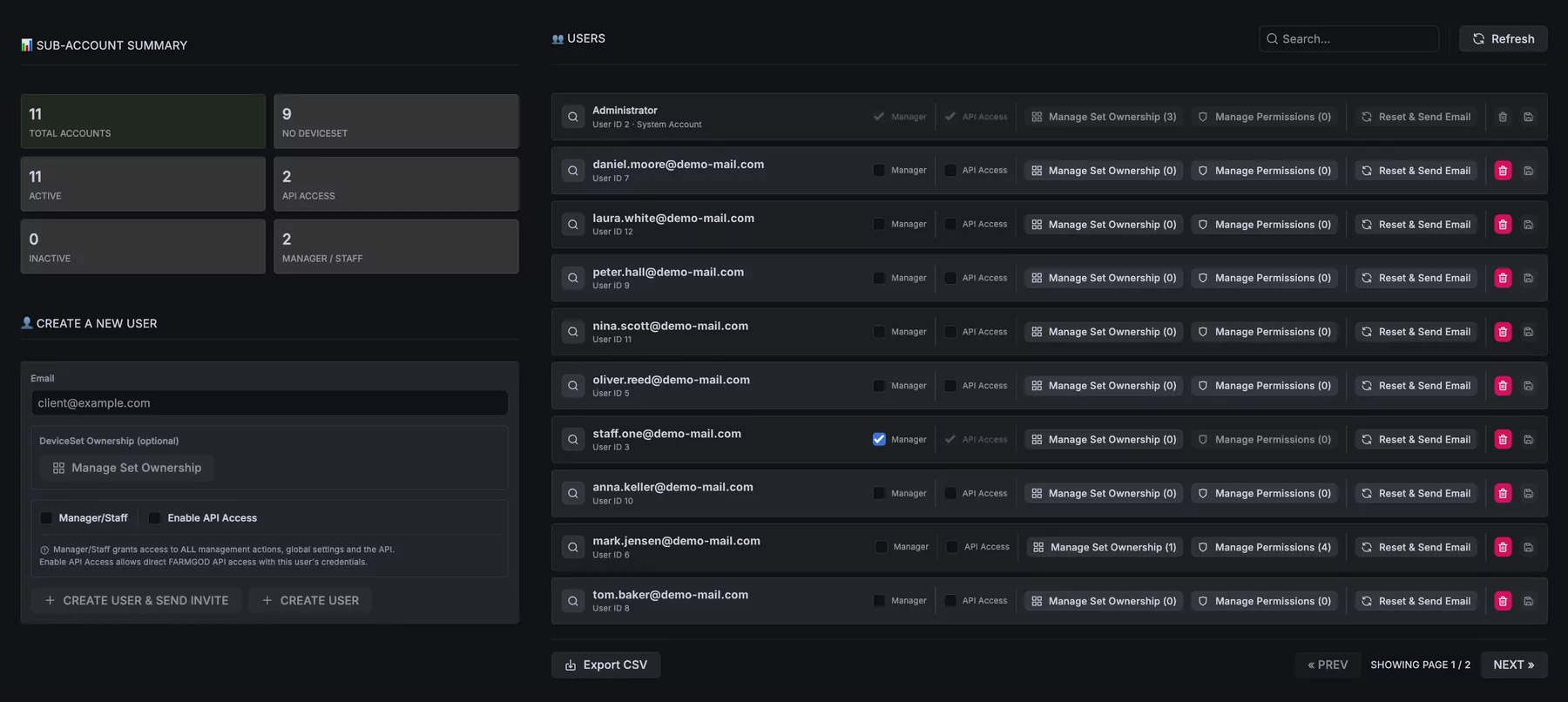
- Create it now, send it later. An account can be prepared silently while the hardware is still being racked. The customer gets the login when everything is ready to be seen.
- Permissions, one by one. Logs and notes, pool settings, reboot, power mode, power limit, sleep and wake, and the tools of single manufacturers: tick what a customer may do. The groups for Antminer, Whatsminer or Sealminer only show up when the customer owns such machines.
- API access per customer. A customer can read their own fleet through the FARMGOD API with their own login, for their own reports or automation.
- Manager/Staff for your own team. Your operators see and do everything. It is not a role for customers.
Ownership that follows the hardware
- Assign and transfer. Give Device-Sets to a customer from their row in the user list. Moving a set from one customer to another asks you to confirm it by name first.
- Honest across a handover. When a Device-Set changes owner in the middle of a month, each customer is billed for the days they owned it.
- Move miners, keep order. Select miners in the list and move them to another Device-Set, or make a new one from the selection. The ownership moves with them at once.
- MAC whitelists for shared sites. With a whitelist, a Device-Set only takes in machines whose address is on its list. One address belongs to one Device-Set. Two customers on overlapping IP ranges never get each other's miners, and a machine swapped in at the same IP does not quietly become "theirs".
Billing: from the meter to the invoice
Every amount a customer sees comes from two numbers you set: the price per kWh on each Device-Set, or one price for a whole location, and a markup per customer, as a fixed amount per kWh or as a percentage. FARMGOD puts them together.
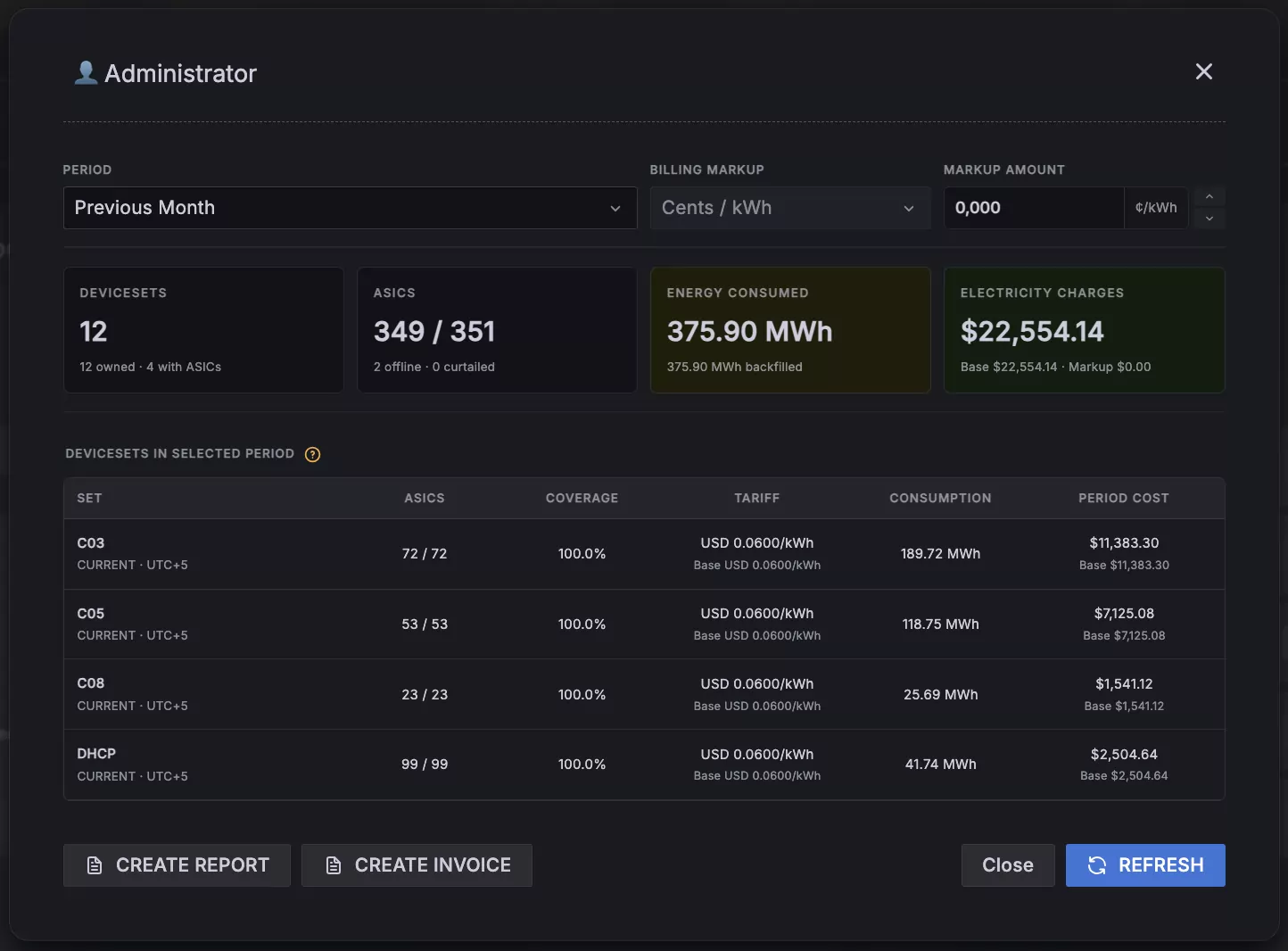
- The usage dashboard. For any period: energy consumed, uptime and cost, split into base cost, your markup and the billed amount. You see your margin, not just a total.
- Report and invoice as PDF. The report sums up the period. The invoice lists each Device-Set at its billed rate, with your logo and your company details.
- Curtailment in the open. The customer's dashboard shows when their Device-Sets were curtailed and why. That answers "why was my hashrate down on Tuesday?" before anyone asks.
- Old invoices stay as they were. A new rate or markup counts from the moment you set it. Nothing is recalculated backwards.
Prepayment for traditional hosting
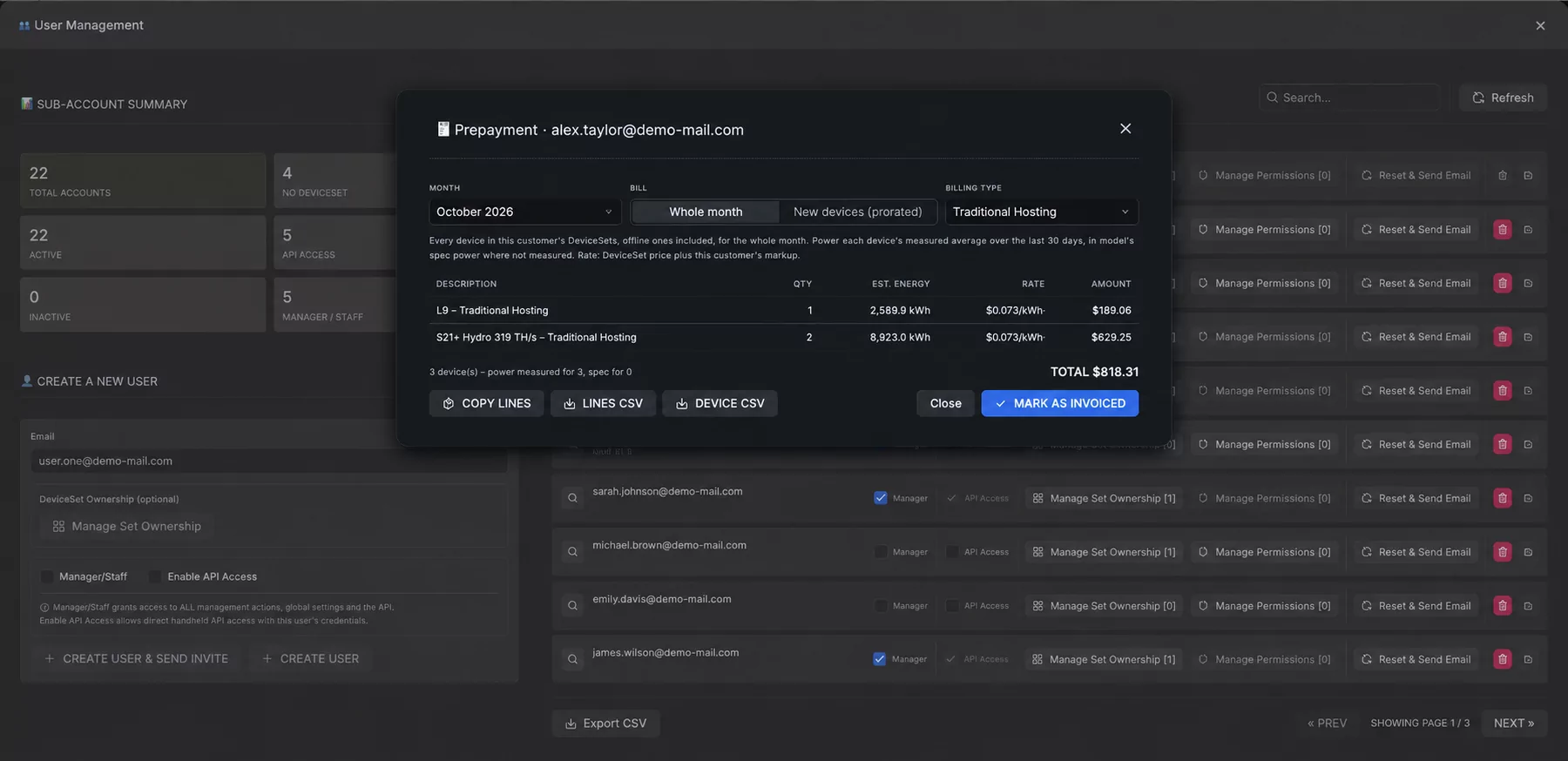
Some customers pay their hosting in advance. The picture at the top shows the window for that.
- A whole month, or only what is new. Bill every machine of a customer for the coming month, or just the machines added since the last invoice, from the day they arrived to the end of the month.
- Measured, not guessed. Each machine is billed with its average power over the last 30 days. A machine that is too new for that is billed with its model's rated power, and marked as such.
- Made for your invoicing program. FARMGOD works out the lines. Copy them or download them as CSV, and write the invoice where you always do.
- Never twice. Mark a prepayment as invoiced and those machines are not billed again for that month.
- A history. Every invoice and every prepayment is listed with its lines, and can be voided when one went out by mistake.
Everything on record
Every action from the dashboard writes a note on the miner: what happened, and who did it, whether that was you, one of your staff or a customer. When a customer asks who rebooted a machine and when, the answer is already on the miner's page.
Where to start
Hosting comes with every FARMGOD Private VPS, and only there: your own server with your own address. The pricing section has the details, and the Hoster's Quickstart Guide in the HELP dashboard walks through every step, from the first customer account to the first invoice.